A stolen laptop shouldn't expose the accounts you manage.
“Following your videos, and just diving straight in, it has been far simpler than I thought and had it created in a couple of hours... this script will give me back a few hours a week to work on other things.”
 Rob Sanders
 Dr. Darren Carter
 Lee Duncan
 Luke Harrison
 Zara Imrie
 Peter Tyler
 Ann Stanley
 Melanie Nichols
 Michael Nadalin
 Jyll Saskin Gales
 Fabrizio Alessandrini
 Sergi Vila
 Isadora Benjamin
 Grant Lewers
 Joe Wine
 Richard Stinauer
 Mike Deiure
 Peter Empson
 Armand Wolfaardt
 Andres Torres
 Gabriele Benedetti
 Vincenzo Rosa
 Corey Koehler
 Martijn Hoekstra
 Ian Harmon
 Iain Calvert
 Andrew Ganesh
 David Browne
 Dejan Smodiš
 Phil Seaton
 Sebastian Iskra
 Anthony Kolliopoulos
 Benjamin Häntzschel
 Ryan Duminy
 Borys Marushchak
 Roger Cooney
 Sonja Funk
 Cindy Ebner
 George Krahn
 Johnny Style
 Myriam Navas
 Damien Fegan
 Mads Ellegård
 Dejan Milanovic
 Ana Kostic
 Hana Kobzová
 Paul Saunders
 Marko Minka
 Sandra (Sandi) Walsh
 Mads Daugaard
 Hester Geerdink
 Adrian Bold
 Andy Hathaway
 Bharathidasan M
 Ryan Baker
 Elliot Earl-Munns
 Lol Lowe
 Fred Naessens
 Bia Camargo
 Chris Beechey
 Darren Craig
 Gabriel Murillo
 Alex Fredheim
 Luke Hamilton
 Andrey Kisselev
Connected safely, with answers you can trust.
You wire Claude into your account once, in about half an hour. After that, two things are true that aren't when you paste data into a chatbot: your clients' accounts stay safe, and every number is worked out by code, not guessed.
Your clients' accounts stay safe.
Claude works on the live account directly, while the account keys stay in an encrypted vault, off every laptop. So you can put AI to work on a client's account without a lost or stolen laptop ever exposing it.
The numbers are worked out by code.
Your data saves to a file and gets analysed by code, the way a calculator does maths. A language model treats each number as a word and guesses the next one; this runs the actual sums. So the answers hold up, and you can stand behind every one in front of a client.
The four problems this course fixes.
The quick way to connect AI drops your login keys into a plain file on your laptop, with no second password. Lose the laptop and whoever finds it can reach every account those keys touch. The course keeps them in an encrypted vault instead, off every machine.
Paste a big report into a chat and all that data fills the conversation up, leaving no room to work on the answer. The course saves the data to a file instead, so the chat stays clear for the real thinking.
You've seen a chatbot hand you a wrong number with total confidence. A language model doesn't do maths, it predicts text, so it treats each number as a word and guesses. The fix: your data saves to a file and the AI writes code to work through it, like a calculator. The numbers are calculated, not guessed.
Each person gets their own key to the connection. If someone leaves, you delete just their key and they're locked out in seconds, with everyone else untouched and the Google Ads logins unchanged. Without this, cutting one person off means changing the real Google credentials across every account.
What to tell the people who've stopped you doing this so far.
The hard part of bringing AI to client accounts is usually the approval, not the setup. So here is the copy, ready to paste.
- The real keys live in one locked-away place, encrypted, off every laptop, never in a plain file on a machine.
- Each person's machine carries only a link and their own token, never your real login keys, and it can't be turned back into the password.
- Each person has their own token, so anyone's access can be removed in seconds without touching the rest of the team.
- Making changes is off by default. It starts read-only, and you flip the switch yourself once you trust it. Even then it stays bounded: small, reversible changes can run inside limits you set, while big, one-way changes wait for your explicit yes.
Your account keys never sit on any of our team's machines. They're held encrypted in one place we control, and any person's access can be removed instantly.
A real connection beats copy-pasting into a chat, and it's safer too.
It sees the whole account, live.
No pasting in a slice of a report and hoping. Claude reads the real account directly, every campaign and search term, current right now.
Ask once, across every account.
Run the same question over your whole book of accounts in one go, instead of pasting each one in by hand.
It's yours, and it remembers.
One file teaches Claude how your accounts work, so you stop re-explaining. No seat fees, no monthly tool, nothing to renew.
Set it up once, in about 30 minutes, and it's yours for life.
There's nothing to download. You do it all in your browser, I walk you through one step at a time, so you're never left guessing what comes next, and you can't accidentally skip the part that keeps you safe.
You build the connection yourself, so by the end you understand exactly how it works and where your keys are. That understanding is the difference between trusting a black box and knowing your accounts are locked down.
The full 17 lessons will take longer if you choose to go through every one. That's optional, not homework, and you don't need to find eight free hours to get value. You're working in your own account after the first 30-minute sitting, and from then on this gives you time back every week.
All in your browser.
You do the whole thing by clicking. Nothing to download.
Stop and pick up where you left off.
You're busy, so the setup saves your progress as you go, so you can split it across two sittings without needing to start over.
About 30 minutes.
That's all it takes. The entry-level Google access you need auto-grants the moment you apply, with no human review and no waiting on anyone, and it's all the course ever needs. There's a higher tier for heavier use you can apply for later, and that one can take a few days, but you never touch it here.
Everything you need to do this safely, in one place, for €47.
You get more than lessons. The reports, the code, and the checklists come with it, so you're working in your own account by the end of the first sitting instead of still reading.
17 lessons across 5 sections
Built in order, so you're never guessing what comes next, and you go at your own pace. The connection works by lesson 4, and you can stop there and already have something running. The rest is yours to watch when you need it.
49 ready-to-run reports
Proven, tested queries for your account. Because each one is known to work, Claude pulls the right report first time, instead of getting stuck trying to fetch something the account can't give it.
All the connection code, ready to paste
It sits right inside the lesson with a copy button, so the connection is all clicking in your browser, with nothing to write and nothing to download. No command line and no scary black screen anywhere. The vault gets set up once with a one-time add to Claude, also just clicks, no coding.
Interactive checklists that save your progress
Tick a step, close the tab, come back tomorrow, and you land exactly where you left off. The setup never makes you start over.
17 lessons, 5 sections, built in order.
Every lesson ends with something working in your own account, not just notes to read, so the value starts on lesson one.
Get operating
Connect, ask, analyse, report. By the end of this section you're working in your own account.
- 01Setup: credentials, tokens, and your manager account
- 02Why a chat chokes on a big report, and how the course gets around it
- 03Where your keys live, and why the vault is the answer
- 04Connecting Claude to your account (and seeing exactly where the keys land)
- 05Talking to your account in plain English
- 06Real analysis: wasted spend, budget pacing, search-term cleanup, with the charts
- 07Privacy and anonymisation
- 08Interactive HTML reports
Make it reliable, make it count
Catch a wrong number before a client does, and turn the work into something that counts for your career.
- 09Trust but verify, so a wrong number never reaches a client
- 10Make Claude remember your accounts
- 11From a question to a saved skill you reuse
- 12Sell it in: lunch and learns, access, and the case for a raise
Team access (optional)
If you have a team, this is how they share the vault without copying keys onto every laptop. Solo? Skip it, you've already got everything you need.
- 13Shared access for a team, with the vault
The click-along setup
From a Google login to your own safe connection, every click on screen.
- 14The click-along setup, step by step in your browser
Appendix and bonuses
Keep these open beside you.
- 15Questions to ask your data
- 16Ethics: what not to do with this
- 17Troubleshooting the errors you might hit
This assumes you already know Google Ads. It teaches you to connect AI to it, safely.
It is not a course on Google Ads itself.
- You're a solo PPC consultant or freelancer, and you want the same safe setup the agencies use, with no team required. The wasted-spend and search-term cleanup that eats a morning per account runs in seconds, so that's a morning back on every account, every week, which is room for clients you couldn't fit before.
- You're the one in-house person on your company's own account, and you want to bring in AI without your IT team, or your own neck, being exposed. The first clean account review you run is something you can drop straight in front of your CMO, with your name on it. If a departing colleague or a contractor walks off with a copy of that keys file, your company's whole ad account is open, and you're the one IT asks about it. The vault closes that.
- You're an agency owner or lead, and you want your team using AI on client accounts without you babysitting every query, and without client credentials sitting on every laptop in the building.
- You know Google Ads inside out but you've never wired an AI straight into an account, and you want to do it without it turning into a coding project.
- You care about where the login keys end up.
- You'd rather understand the system you build than rent someone else's tool forever.
- You've never worked in the Google Ads UI as a professional. This isn't where you start.
- You want a literal one-button magic tool. You do follow along to set this up, every step on screen, which is exactly why you end up understanding it.
- You want a hands-off tool that runs the account for you with nobody watching. This isn't that. It starts read-only, you turn changes on when you trust it, and even then you set what it's allowed to do on its own, so you're always the one in charge.
- You're not willing to spend about half an hour on a guided setup. That half hour changes how you work on every account from now on, but it is still half an hour, so know that going in.
People already working this way, in their own words.
"I got 4 new clients last week, one bigger than I have ever had. The only reason I'm comfortable dealing with them all at once is because of the Brain."

"Speaking as a guy who doesn't have coding experience and runs an agency, yes, all of this is true. Unbelievable stuff that has changed the way we operate."

"I sent the report to a new client who hasn't even onboarded yet. They replied, 'This report is absolutely amazing. Thank you so much.'"

"I've been paid to do Google Ads for the last 15 years, and what's exciting is that this change is way more fun and creative than PPC. I'm now a builder."

"I just killed another subscription. The real win isn't saving money, it's that I own the code and can update it just by speaking."

"In two weeks I built a pacing dashboard, YoY performance forecasts, a draft client website, and a competitor intelligence report. It will definitely change the way I work this year."

It starts read-only. It fetches the data, runs the maths, and writes the report, and it never touches the account until you turn changes on yourself. When you trust it, you flip the switch. Even then you stay in control: small, reversible changes can run on their own inside limits you set, while big, one-way changes still wait for your explicit yes. The course covers exactly what's safe to let it do and what isn't.
Priced so you can just buy it. Today.
€47 is one small one-off payment, less than an hour of your time, with no subscription on the course and nothing to renew. The only ongoing cost is a Claude plan, which you probably already have.
So buying the course is a simple, expense-it-on-a-card decision that commits nobody and puts nothing live.
What €47 buys is bigger than the price. It changes how you, or your whole team, work on every account from now on: audits in minutes instead of mornings, numbers you can defend, reports your clients or your CMO actually read.
"This is the safe, approved way to put AI to work on the account. The keys are held encrypted in one place, off every laptop, and each person has their own token, so anyone's access can be removed in seconds if they leave. I'm the one bringing AI to our paid search, done properly." That's the lines you can paste into an email to get it signed off.
Then weigh what doing nothing costs.
The things people ask before buying.
I'm not very technical. Can I really do the setup?+
Yes. You do the connection by clicking in your browser, with nothing to write, nothing to download, and nothing to install. Claude writes and runs every script and explains what it did, so you just read the output. The checklists save your place so you never start over, and the Ads2AI community is right there if you get stuck. If you can follow a recipe, you can do this.
How long does the setup take, and how much of my week will it eat after that?+
About 30 minutes of clicking, once, and it's connected for good. After that there's no daily ritual and nothing to maintain: an audit that used to take a morning runs in a couple of minutes, whenever you want it. The 17 lessons are bite-sized, so you watch what you need when you need it. There's no marathon to sit through, and the connection itself works by lesson 4.
Where do my account keys live, and is it safe enough for locked-down IT?+
In your own private vault on the web, held encrypted, not on my servers, which you stand up with a few clicks. The only thing that ever sits on a laptop is a link and a per-person token, never your real login keys, and can't be turned back into the password. Each person gets their own token, so you can switch off one person in seconds without touching anyone else, and the Google Ads logins never change. I built and tested this on a live account in June 2026, and the IT and client lines further up the page are the exact text to hand your security lead.
Isn't the MCP the easy way in?+
No, and this matters so you're not sold a false shortcut. The MCP needs the same developer token (with Google's approval), the same manager account, and the same sign-in as any other route. The only thing it does differently is pop up its own sign-in window instead of a separate step. So you do the same work either way, which is exactly why the course has you finish with your keys in the vault rather than back on your laptop. An API is just the door Google opens so software can read your account; an MCP is one tidy way to hand that door to an AI so you can talk to it. The course explains both in plain English and tells you which one you want for what you're doing.
How long does Google take to approve access?+
The entry-level API access auto-grants in the same step you apply, with no human review, and that's all the course needs from start to finish, so you're not stuck waiting on a person. There's a higher tier you can apply for later if you ever want it, and Google says that one takes about five business days and has sometimes run longer. You don't wait on it for anything in the course.
Will Claude change my campaigns automatically?+
Not unless you turn it on. It starts read-only, so it analyses, reports, and suggests, but doesn't touch the account. When you've seen it get the analysis right and you trust it, you flip the switch yourself. Even then you stay in control: small, reversible changes like a negative keyword can run on their own inside limits you set, while big, one-way changes like a large budget shift still wait for your explicit yes. The course covers exactly what's safe to let it do and what isn't, for the day you choose to let it do more.
Which Claude do I need, and what does it cost for a team?+
Any Claude with a project workspace works: Cowork (in the Claude desktop app) or Claude Code. A paid plan covers it, and the $20/month one works. Only the people actively running analysis need a seat, paid to Anthropic, not me; anyone who just reads the reports needs nothing. The shared vault is what the team uses, so you set the safe connection up once and nobody's keys land on a laptop. The free version of Claude can't save files or run code over a whole report, which is the entire point here, so you do need the paid plan.
Do I need a Google Ads manager account (MCC)?+
No. An MCC makes multi-account work easier, but a single Ads account is fine, and plenty of people do this with one. The first section covers both.
What if Google changes the UI again?+
Google redesigned the login screens while I was building this course, so it already covers the current Google Auth Platform UI and its gotchas. Google moves things around from time to time, and the steps stay the same even when a button moves. The course teaches you what each step is for, so you can follow it even if a screen looks a little different from the screenshot.
Is this affiliated with Google or Anthropic?+
No. It's independent. I run ads2ai, an Australian agency that's managed Google Ads for over a decade, and the course is what I actually do with my own clients.
A Google Ads audit skill, yours to keep.
I could sell this on its own; it's included. Point it at an account and it pulls the data, builds the charts, and writes up a full audit: campaigns, search terms, assets, geography, trends, and a list of prioritised actions. The kind of report that takes a morning, ready in a couple of minutes.
It's a head start, not a replacement for your judgement as a marketer. It does the gathering and the first pass, fast, so your time goes on the thinking instead of the spreadsheet.
Add a section, drop one you don't use, or change where it lands. Want an interactive web report instead of a PDF, or the numbers in a Google Sheet? You just tell Claude, and it does it.
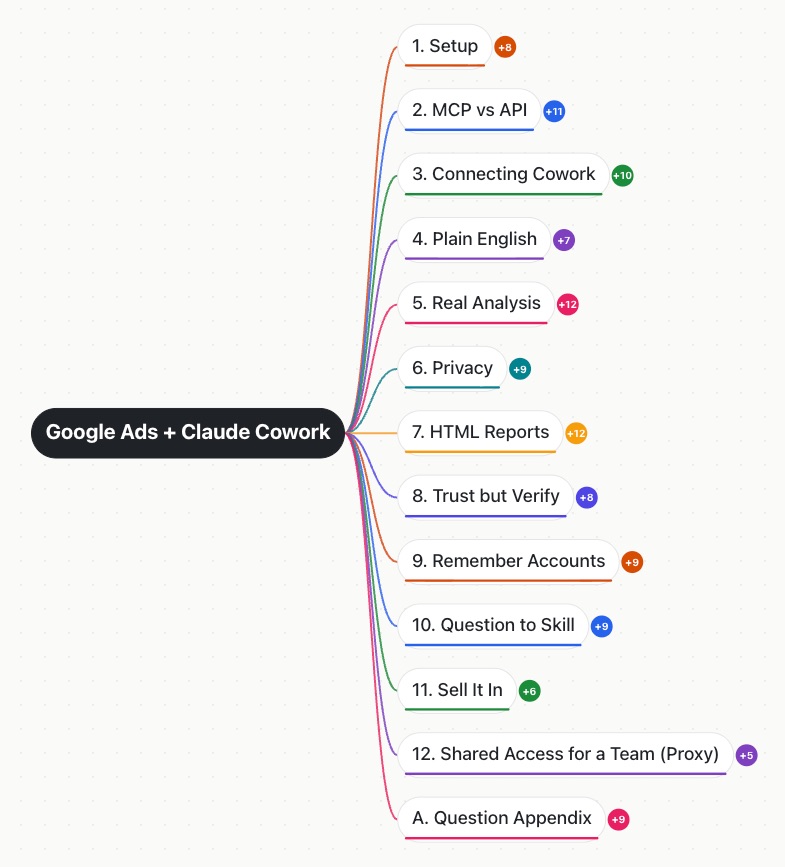
The whole course on one page.
A mind map of every module and section, so you can see the layout of the whole course at a glance and find your way back to any lesson. Yours to keep when you join, as an interactive version you can click through.

Hi, I'm Mike.
I ran a Google Ads agency in Australia for over a decade, so I understand the risks. This is how I'd give my team AI access to clients' accounts, whether that's for a single business or an MCC with 500+ accounts.
Get real answers in seconds, the maths done by code, and the keys off every laptop, for life.
It's all just clicking, nothing to download, every step walked through. Your numbers get calculated by real code, and a stolen laptop can't give your accounts away. One small payment, today, and you're the one who can say "yes, we use AI on these accounts, safely, and the keys never touch a laptop."